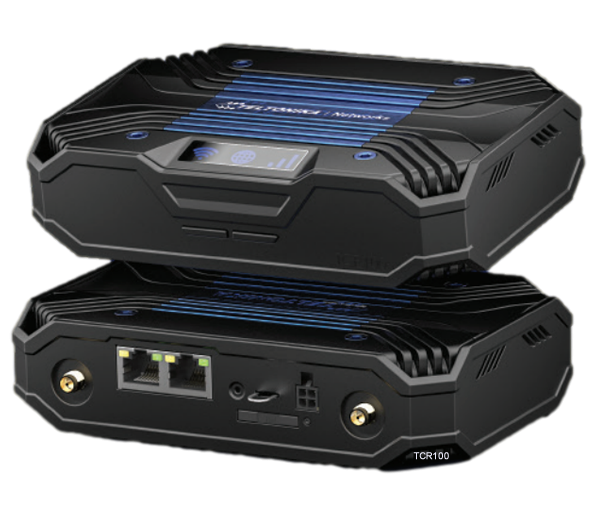
If you’re working with Teltonika 4G routers in the UK — whether for IoT, retail, energy, or CCTV — the router itself is only half the story. The other half is the antenna. A properly chosen and installed IoT antenna will make the difference between a stable, high-throughput link and a flaky, support-draining nightmare.
This guide explains exactly how to pick the right 2J antenna for your Teltonika 4G router. It covers the UK 4G frequency bands, the popular Teltonika models, antenna types, installation practices, and common mistakes. No fluff, no empty marketing claims — just practical advice you can use in the field.
Why IoT Antennas Matter
A Teltonika router like the RUT241 or RUT951 is a powerful tool, but it can only work with the RF signal delivered to its SMA ports. The antenna determines:
- Which bands you can actually use in the UK.
- Whether MIMO (multiple-input, multiple-output) works as intended.
- How much of the router’s power is radiated effectively.
- How much of the network’s signal arrives with good SINR (signal to interference and noise ratio).
The wrong antenna — or a bad installation — will waste the capabilities of even the best Teltonika router. A properly selected 2J IoT antenna, matched to the environment, ensures that your project runs reliably, with fewer site visits and support calls.
The UK 4G Band Landscape
To understand IoT antennas in the UK, you need to know the active LTE bands:
- Band 20 (800 MHz) – Long range, rural coverage, penetrates buildings well.
- Band 3 (1800 MHz) – Widely deployed, balance of speed and coverage.
- Band 1 (2100 MHz) – Increasingly used as 3G is refarmed, good city capacity.
- Band 7 (2600 MHz) – High speed, short range, mostly in urban areas.
- Band 28 (700 MHz) – Now rolling out, excellent for indoor penetration and rural fill-in.
An IoT antenna must cover the full 700–2700 MHz range to guarantee performance across these bands. 2J Antennas are engineered for this exact wideband coverage, which is why they’re a safe match for Teltonika hardware.
Popular Teltonika 4G Routers in the UK
RUT200
- Entry-level LTE Cat 4.
- Dual SMA ports for 2×2 MIMO.
- Compact and cost-effective for IoT.
RUT241
- The successor to the best-selling RUT240.
- 2× SMA LTE ports (2×2 MIMO).
- Perfect for retail POS, IoT monitoring, and small CCTV sites.
RUT901
- Dual SIM, more LAN ports.
- Still 2× SMA LTE ports.
- Flexible for industrial networks.
RUT951
- UK’s most common Teltonika 4G router.
- Dual SIM, Wi-Fi, dual SMA LTE ports.
- Rugged design, widely used in IoT and retail.
RUT956
- Like RUT951 but adds GNSS and serial I/O.
- Used in transport, tracking, and energy networks.
Every one of these routers expects a 2×2 MIMO IoT antenna setup — two properly matched elements, either in a single 2J puck/shark-fin housing or two external panels.
Types of 2J IoT Antennas for Teltonika Routers
2J Antennas provide a wide range of IoT antenna designs that suit Teltonika 4G routers in different environments:
Low-Profile Pucks
- Bolt-mount or adhesive, IP67/69K.
- Wideband (698–2700 MHz).
- Provide two independent LTE elements for MIMO.
- Best for: RUT241 and RUT951 in cabinets, kiosks, and outdoor boxes.
Shark-Fin Multi-In-One Antennas
- LTE + Wi-Fi + GNSS in one housing.
- Clean, vandal-resistant, ideal for vehicles.
- Best for: RUT956 in transport or smart energy.
Magnetic Mounts
- Quick to deploy, easy to reposition.
- Useful for surveys or temporary IoT networks.
- Best for: RUT200 or RUT241 during coverage tests.
Directional Panels
- Cross-polarised for 2×2 MIMO.
- Focus gain at a known mast, improving SINR.
- Best for: RUT951 or RUT956 in rural UK sites with weak 4G.
Omni vs Directional Antennas
- Omni (pucks, fins): Best in urban or mobile deployments. They “hear everything” but can also pick up interference.
- Directional panels: Best in rural areas or where one mast dominates. They improve SINR and throughput, but need alignment.
Rule of thumb: If you know the mast direction, go directional. If you don’t or the site is mobile, go omni.
MIMO Geometry: Get It Right
Teltonika routers use 2×2 MIMO for 4G. This only works if your IoT antenna has two properly separated or polarised elements. Common mistakes include:
- Using one external antenna and one stock paddle.
- Using two unmatched antennas.
- Mounting elements too close together.
2J dual-element antennas are designed to solve this in one neat package — two properly oriented elements in a single puck or shark-fin.
Cable Loss: The Silent Performance Killer
At 1800–2600 MHz, cable loss is brutal:
- RG58: ~1 dB per metre. 5 m = 5 dB loss (catastrophic).
- LMR-240: ~0.4 dB per metre.
- LMR-400: ~0.2 dB per metre.
Best practice:
- Keep IoT antenna cables ≤ 2 m.
- Use low-loss cable for longer runs.
- Extend Ethernet, not RF, when possible.
Mounting Surfaces and Ground Planes
Many 2J puck antennas need a ground plane (metal surface) to radiate correctly. If mounting on plastic, add a steel plate. For shark-fins, flat secure mounting is key. Directional panels need correct azimuth and tilt — small adjustments make big differences.
Reading the Metrics in RutOS
Teltonika routers give real metrics:
- RSRP: –80 to –95 dBm is decent. Below –110 is poor.
- RSRQ: –3 to –10 dB is healthy. Lower = noisy.
- SINR: >10 dB is good. <0 dB = interference hell.
Always test before fixing your IoT antenna permanently.
UK IoT Deployment Scenarios
Retail Payment Terminals
- Router: RUT241.
- Antenna: 2J dual puck on cabinet.
Rural CCTV
- Router: RUT951/956.
- Antenna: 2J cross-pol panel aimed at mast.
Vehicle Tracking
- Router: RUT956.
- Antenna: 2J shark-fin (LTE + Wi-Fi + GNSS).
Smart Energy
- Router: RUT200/241.
- Antenna: 2J rugged outdoor puck.
Troubleshooting Checklist
- Always connect both LTE ports.
- Replace long RG58 with low-loss cable.
- Move antenna 30–50 cm if multipath issues appear.
- Weatherproof all outdoor connectors.
- Recheck RSRP/RSRQ/SINR after alignment.
FAQ: IoT Antennas for Teltonika 4G Routers
Q: Do all Teltonika 4G routers need 2×2 MIMO?
Yes. Every RUT200, RUT241, RUT901, RUT951, and RUT956 requires dual antennas.
Q: Which 2J antenna works best in rural UK sites?
A 2J cross-polarised panel aligned to the mast.
Q: Can I mix one external antenna with a stock paddle?
No — it kills MIMO and reduces performance.
Q: Do 2J antennas cover all UK 4G bands?
Yes — 698–2700 MHz wideband coverage.
Q: Do puck antennas need ground planes?
Yes, unless specified otherwise. Always mount on metal.
Final Word
In the UK, 4G IoT deployments succeed or fail on antenna choice. Pairing Teltonika routers like the RUT241 and RUT951 with 2J Antennas ensures wideband coverage, rugged durability, and proper MIMO performance.
The formula is simple:
- IoT antenna first, router second.
- Match antenna type to site conditions (puck, shark-fin, directional).
- Keep cables short, check your metrics, and weatherproof everything.
Do this, and your IoT projects will run with fewer headaches, better speeds, and greater reliability.